How we handle feedbacks in the client side
Things to have in mind before learning how to implement new states feedback
Feedback prefabs
Unity GameObject prefabs with a particle system component to show the particles effect of the state to display. You can find them in Client/Assets/Prefabs/Feedbacks/States
FeedbackContainer
You can find this prefab inside each character prefab; it contains a script with the same name with a list of the Feedback Prefabs to activate. You have to set each prefab in the unity editor to the list. The methods we have here are:
-
SetActiveFeedback(string name, bool activate)Activate or deactivate the feedback that matches the name parameter depending on the boolean activate -
GetFeedbackList()Return the feedback prefabs list.
PlayerFeedbacks
You can find this prefab inside the BattleManager prefab, it serves as a connection between Battle.cs and FeedbackContainer. It implements a lot of methods for the feedbacks, but the ones to handle the feedback states are:
-
SetActiveFeedback(GameObject player, string feedbackName, bool value)This is in charge of connecting theBattle.csandFeedbackContainersetting the feedback depending on the name and value. -
ClearAllFeedbacks(GameObject player)This method is really simple. It just clears all the active feedbacks, setting all thesetActiveof each feedback of the player to false.
Battle.cs
In this script we map the backend effects to the client effects. This script is huge! Fortunately, we only care about a couple of things here:
-
StateEffectsAn Enum that stores the PlayerEffect states. Why don't we use just thePlayerEffectEnum instead of thisStateEffects? Because we only care about the State effects such as Poisoned and Slowed and not the rest of the effects such as Rage, Disarm, etc. -
playerUpdate.EffectsThis is a MapField collection with the effects from the backend. We care about the keys to compare them with ourStateEffectsEnum. -
bool PlayerIsAlive(Player playerUpdate)This method is pretty simple. Returns if the player is alive or not. We want to know it to display the effects only on alive players. -
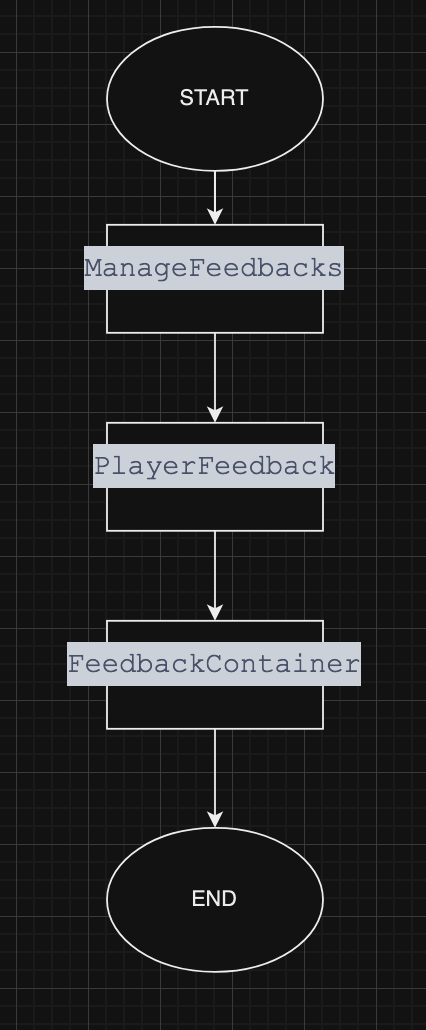
void ManageFeedbacks(GameObject player, Player playerUpdate)This method is where we combine everything we've talked about so far. Activates the feedback's effects depending on theplayerUpdates.Effectsand callsPlayerFeedbacks>().SetActiveFeedbackto activate or deactivate the feedback. Also, it clears all active effectsif(playerUpdates.Effects.Keys.Count == 0)In a nutshell, this method controls the complete flow of the feedback states.
Check out this flowchart for a better understanding of the flow.
Simplified example